
Duplicate MP3 Finder
Find and delete duplicate MP3s with Easy Duplicate Finder™ on your PC and Mac - it’s never been easier!
Are you sure that your computer doesn't have any duplicate music files? You may not realize how many duplicate MP3s you have until you set your player to shuffle tracks. Suddenly, you’re hearing the same songs over and over -- and not because you’ve set your favorites on repeat! This calls for finding and deleting those pesky duplicate MP3s from your computer, smartphone or media player.
The easiest, fastest and most reliable way to find duplicate MP3 files is to use a duplicate finder that works on all of your devices so that you don’t have to worry about keeping your music library clean wherever you’re listening from. Easy Duplicate Finder™ will help you find and delete duplicate MP3s and other music files from your PC, Mac or any USB-connected media device, like your phone or MP3 player. When your device is connected, it gets a drive letter assigned to it. From there, simply add the device’s music folder to the "Include to Scan" zone and follow the prompts.
With Easy Duplicate Finder™ you can organize your music library the easy way -- it only takes a couple of clicks. The program will free up gigabytes of disk space on your computer or mobile device and make room for more music.
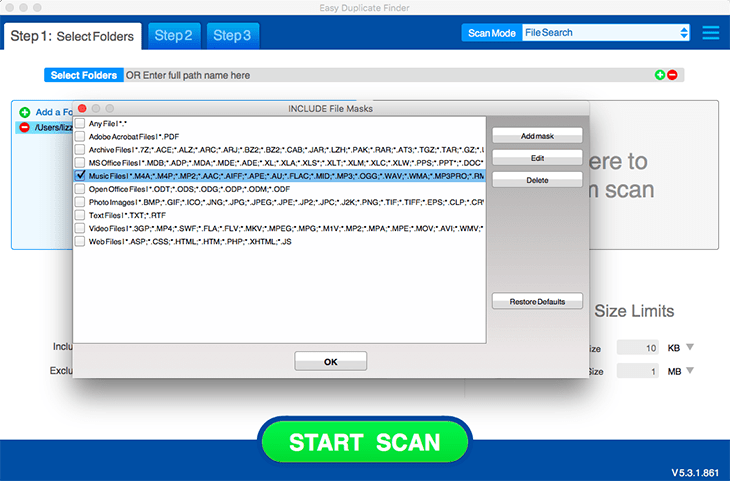
To start scanning your computer for duplicate music, click on the “File Types” button and choose ‘Music Files’, then run a scan. This will ensure that Easy Duplicate Finder™ only scans music files and doesn't waste time on other file types.
Once the scan is complete, you will be able to review the scan results and delete, move or rename duplicate MP3s in just a couple of clicks. Before you start deleting files, use the Preview feature to listen to the tracks and make sure you don't delete anything you want to keep!
BENEFITS
- The fastest duplicate MP3 finder.
- Organize your music albums hassle-free.
- Free up valuable disk space.
- Delete duplicate music in just one click.
FEATURES
- Find duplicate music files.
- Compare your music by content using byte-by-byte matching.
- Preview audio files right from Easy Duplicate Finder.
- Find duplicate songs on your phone, iPod, removable drives, and more!